This article is general guidance, not legal advice.
Since 1 June 2024, Malaysia’s Occupational Safety and Health Act 1994 (OSHA), as amended in 2022, has applied to nearly all places of work, including ordinary offices. If you employ people, you must assess safety and health risks, put necessary controls in place, and appoint an Occupational Safety and Health (OSH) Coordinator at a workplace with five or more employees if that workplace is not required to have a Safety and Health Officer.
Key Takeaways
- OSHA now applies to all places of work in Malaysia, subject to specific exclusions in the Act’s First Schedule.
- Every employer must assess workplace safety and health risks under section 18B and implement controls when the assessment shows they are needed.
- An OSH Coordinator is required at a workplace with five or more employees if that workplace is not in a class required to have a Safety and Health Officer.
- Office risks can include workstation setup, cables, electrical equipment, walkways, storage, indoor conditions and how work is organised.
- New furniture can help control a risk, but buying a chair or desk alone does not replace assessing the risk and checking whether the control works.
The 2-minute version
If you manage an office, start here this week:
- Walk the workplace. Look for trip hazards, damaged equipment, poor storage and awkward workstation setups.
- Ask employees what gets in the way. They often spot daily problems that a quick inspection misses.
- Write down the risks and actions. Use DOSH’s HIRARC guidance to structure the assessment. HIRARC means Hazard Identification, Risk Assessment and Risk Control: a way to identify hazards, judge the risk and decide what to do.
- Check the Coordinator requirement. If you have five or more employees at the workplace and it is not required to appoint an SHO, appoint an OSH Coordinator. An OSH Coordinator is an employee appointed to coordinate occupational safety and health issues at that workplace.
- Assign owners and follow up. Give each action a person responsible and a date to check whether it worked.
Does OSHA apply to your office?
Yes. Section 1 of the Act says that, subject to its First Schedule, OSHA applies to all places of work throughout Malaysia. That includes ordinary offices, co-working workplaces and office areas in places such as private schools or clinics.
The Act does not list every type of premises by name. If your workplace or activity may fall under an exclusion in the First Schedule, check the Act and get advice on how it applies to your situation.
For most office managers, the practical point is simple: a workplace does not need machinery or a production line to have safety and health risks. People can trip over cables, strain themselves at a poorly set up workstation, or be affected by unsafe storage and damaged electrical equipment.
Responsibility may also be shared. In a co-working office, for example, you may control your team’s equipment and work practices, while the building manager controls shared corridors or lifts. Contractors have responsibilities for their own work. Agree who handles each issue and how you will raise a concern.
Common mistakes
- Assuming an office is outside OSHA because it has no factory equipment.
- Treating a shared building’s safety issues as someone else’s problem without agreeing who will act.
What must you do under the amended Act?
The Act requires employers to provide and maintain, so far as is practicable, a safe working environment and safe systems of work. It also requires the necessary information, instruction, training and supervision.
Section 18B adds a specific duty: employers, self-employed people and principals must assess safety and health risks to people who may be affected by their undertaking at the workplace. If the assessment shows that controls are needed to eliminate or reduce a risk, they must implement those controls.
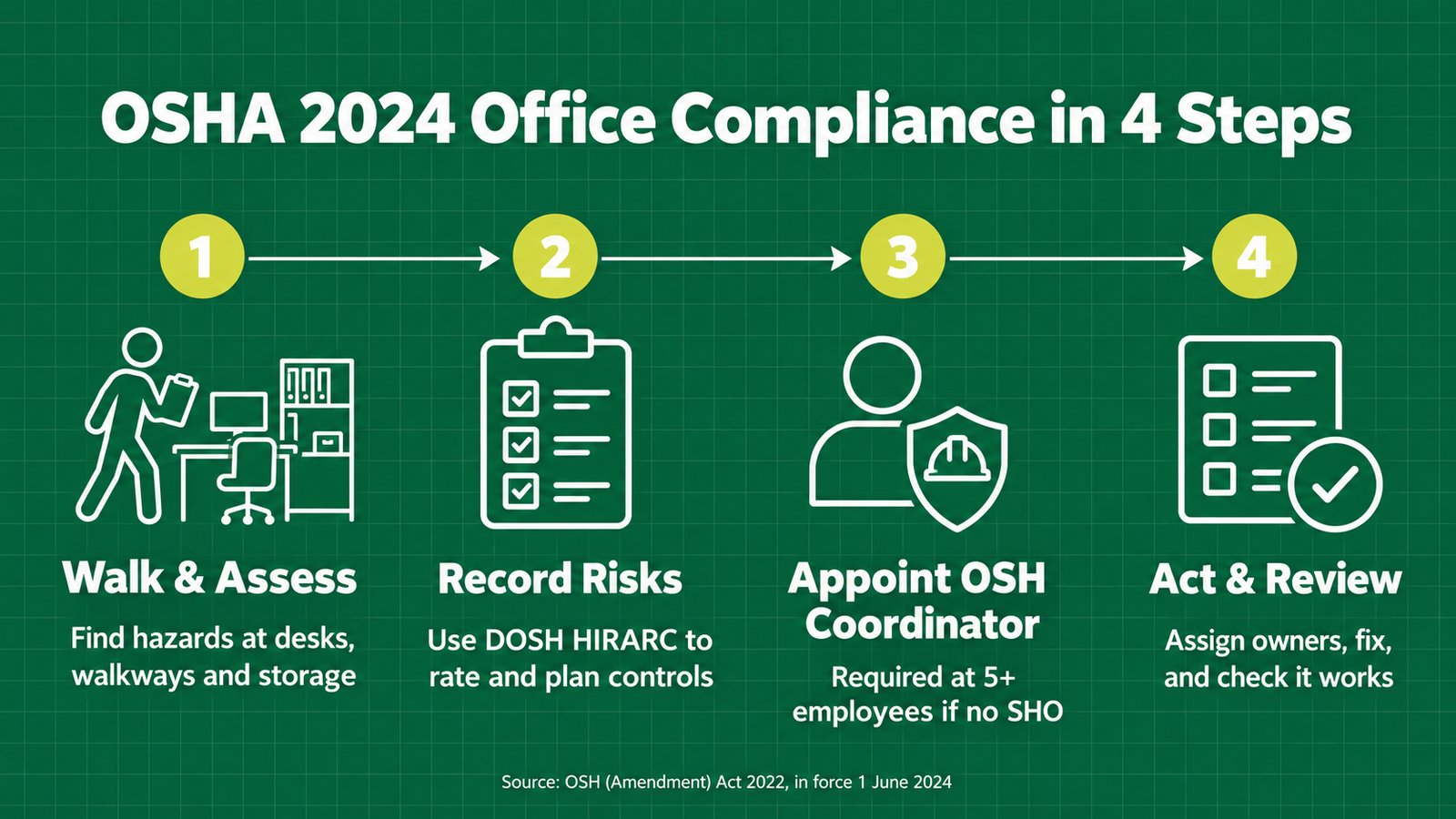
Use the checklist below to turn those duties into workplace actions. Keep records that match what you actually did. A form is useful when it helps you spot a problem, assign an action and check the result.
| Employer action |
What it means in an office |
Evidence to retain |
| Conduct a risk assessment |
Identify hazards, who may be affected, and how serious or likely harm could be. |
Assessment, date, workplace or task covered, and people involved. |
| Implement suitable controls |
Eliminate or reduce risks identified by the assessment. |
Action plan, purchase or maintenance records, and updated procedures. |
| Provide information and instruction |
Explain safe work practices, reporting channels and relevant controls. |
Induction materials, briefings and attendance records. |
| Maintain the workplace |
Keep work areas, access routes and equipment in safe condition. |
Inspection records, maintenance requests and closure notes. |
| Review when things change |
Reassess when there is a significant change or a control no longer works. |
Revised assessment and follow-up records. |
| Coordinate OSH matters where required |
Appoint an OSH Coordinator if the workplace and employee threshold conditions apply. |
Appointment record, responsibilities and coordination records. |
Is risk assessment required for a small office?
Yes. Section 18B applies to employers of any size. You can make an assessment proportionate to your workplace, but you should still look at the real tasks, people and conditions in your office.
Start by walking around during normal work. Watch how people use their desks, move through walkways, store items and handle equipment. Ask employees where they feel awkward, unsafe or uncomfortable. Record the hazard, who could be affected, the risk and the control you plan to use.
DOSH’s HIRARC guidance is a useful way to organise this process. It helps you identify hazards, assess risk and plan controls. For example, if you find loose cables across a walkway, you might reroute or secure them. If employees are repeatedly turning to view a screen, you could rearrange the workstation.
The assessment should lead to decisions. Give each action an owner and follow-up date. Then check whether the control has reduced the risk. If it has not, revise your plan.
Example: a 25-person office in Bayan Lepas
This is a fictional example to show how an office might approach the process.
A 25-person office in Bayan Lepas asks its manager and employees to walk through the work area together. They check workstations, meeting areas and the routes people use during the day.
They find three issues: trailing cables cross a walkway, several employees use laptops without stands, and the fixed-height desks do not suit every employee. The team records who could be affected and what could happen. A cable could cause a trip; laptop users may lean forward for long periods; and a fixed desk may lead some people to raise their shoulders or bend their wrists to reach the keyboard.
The office first secures and reroutes the cables, then checks that the walkway stays clear. It provides laptop stands and separate keyboards where the assessment identifies a need. It reviews workstation adjustments and considers whether adjustable desks or other changes are suitable for the tasks and employees.
Because the workplace has five or more employees, the employer checks whether it is in a class required to appoint a Safety and Health Officer. If it is not, the employer appoints one of its employees as OSH Coordinator under section 29A. That person helps coordinate concerns and track actions; the employer remains responsible for its duties.
This example is illustrative. Your assessment should reflect your own workplace, tasks and employees.
Common mistakes
- Buying new chairs before doing the risk assessment.
- Completing the assessment but not assigning anyone to carry out the actions.
When does your office need an OSH Coordinator?
Under section 29A, an employer must appoint one of its employees as an OSH Coordinator when the workplace is not included in a class or description that requires a Safety and Health Officer, and the employer has five or more employees at that workplace.
A Safety and Health Officer (SHO) is a competent person required at certain classes of workplaces specified under section 29. An OSH Coordinator and an SHO are different roles.
The Coordinator’s purpose is to coordinate occupational safety and health issues at the workplace. Appointment does not transfer the employer’s legal duties to that employee. Make the appointment clear, explain the responsibilities and give the Coordinator enough time and access to information.
| Workplace situation |
What to check |
| Fewer than five employees at the workplace |
The section 29A appointment threshold is not met, but the employer’s other OSHA duties still apply. |
| Five or more employees; workplace is not in an SHO class |
The employer must appoint one of its employees as OSH Coordinator. |
| Workplace is in a class requiring an SHO |
Check the applicable order and appoint a competent SHO as required. The Coordinator rule is not a substitute. |
| Several offices or sites |
Check the threshold and requirements for each relevant place of work. Do not assume one appointment automatically covers every site. |
A practical Coordinator can help arrange inspections, collect employee concerns, track assessment actions and bring unresolved issues to management. The employer should make sure the Coordinator knows how to escalate a concern that needs a decision or resources.
Common mistakes
- Assuming an OSH Coordinator replaces an SHO where the workplace is required to have one.
- Naming a Coordinator but giving them no time, access or clear way to report issues.
What changed for employee rights and penalties?
Section 26A gives employees a right to remove themselves from imminent danger in specific circumstances. The employee must first inform the employer or its representative that they have reasonable justification to believe there is imminent danger. If the employer fails to take action to remove it, the employee may remove themselves from the danger or work. The Act protects an employee who does this from undue consequences and discrimination.
The amendment also increased penalties for some offences. The penalty depends on the specific section and offence, so check the Act rather than relying on a general headline figure. This article does not list penalty amounts.
What office risks should you assess?
An office assessment should match the work people actually do. A person who works at a computer for most of the day has different exposures from a receptionist, facilities worker or employee who regularly moves files and equipment.
- Workstation ergonomics: chair fit, desk height, monitor placement, keyboard and mouse position, prolonged sitting and repetitive movements.
- Access and housekeeping: walkways, stairs, loose mats, open drawers, storage height and items on the floor.
- Electrical safety: damaged plugs or cables, overloaded adaptors and unsafe cable routing.
- Work equipment: the condition, stability and suitability of furniture, monitor arms and other equipment.
- Indoor conditions: ventilation, temperature, glare, lighting and noise where these may affect health or safe work.
- Work organisation: long periods in one position, workload, work pace and ways to report concerns.
- Shared areas and contractors: visitors, cleaners, maintenance workers and responsibilities between tenants and building management.
Ergonomics means fitting work, equipment and the workplace to the people who use them. It includes how a workstation is arranged and how tasks are carried out.
This list is a starting point, not a substitute for looking at your own work. Consider who may be affected, including employees, visitors and contractors.
Should you buy ergonomic chairs or height-adjustable desks?
Furniture can be one control, but a purchase alone does not complete the assessment. First identify the issue. It could be a worn chair, a fixed-height surface that does not suit the task, or a monitor position that leads to repeated twisting.
Then consider what would help. The answer might be an adjustment, replacement, accessory, layout change or a change to the task. If you choose a height-adjustable desk, check its usable height range, stability, load capacity, controls and fit with the rest of the workstation. Show users how to adjust it safely.
The aim is to support suitable changes in posture and task based on the assessment. Standing should not be treated as a replacement for all seated work.
What workstation setup should you check?
Use this table as a practical review. It offers ergonomic guidance for assessment and improvement; it does not set fixed statutory dimensions under OSHA.
| Workstation element |
What to check |
Practical adjustment |
| Chair |
Is the seat stable and in good condition? Can the user sit with feet supported and the back supported? |
Adjust seat height and back support; provide a footrest where suitable if the user cannot comfortably support their feet. |
| Desk |
Can the user reach the keyboard and mouse without sustained shoulder elevation or excessive reaching? |
Clear unnecessary items; reposition frequently used equipment; assess whether the work surface suits the user and task. |
| Monitor |
Is the screen positioned to reduce repeated neck turning, forward leaning or glare? |
Place it in front of the user, at a comfortable viewing distance and height; adjust for glasses, task and screen size. |
| Keyboard and mouse |
Can the user keep them close enough to work without stretching or bending the wrists excessively? |
Position them within easy reach and allow enough space to move the mouse comfortably. |
| Lighting |
Is there glare, reflection, poor visibility or strong contrast between the screen and surroundings? |
Change the screen angle, manage daylight and use suitable task lighting where needed. |
| Cables and floor space |
Are cables or personal items creating a trip hazard or blocking movement? |
Route and secure cables; keep exits and walkways clear. |
| Work pattern |
Does the task involve long periods in one position or repeated movements? |
Consider task variation, brief movement opportunities and work organisation as part of the control plan. |
DOSH has published Guidelines on Occupational Safety and Health for Seating at Work (2003) and a newer Guideline Seating at Work (2024). DOSH also lists Guidelines on Ergonomics Risk Assessment at Workplace 2017. Use the relevant DOSH guidance when reviewing seating and ergonomic risks.
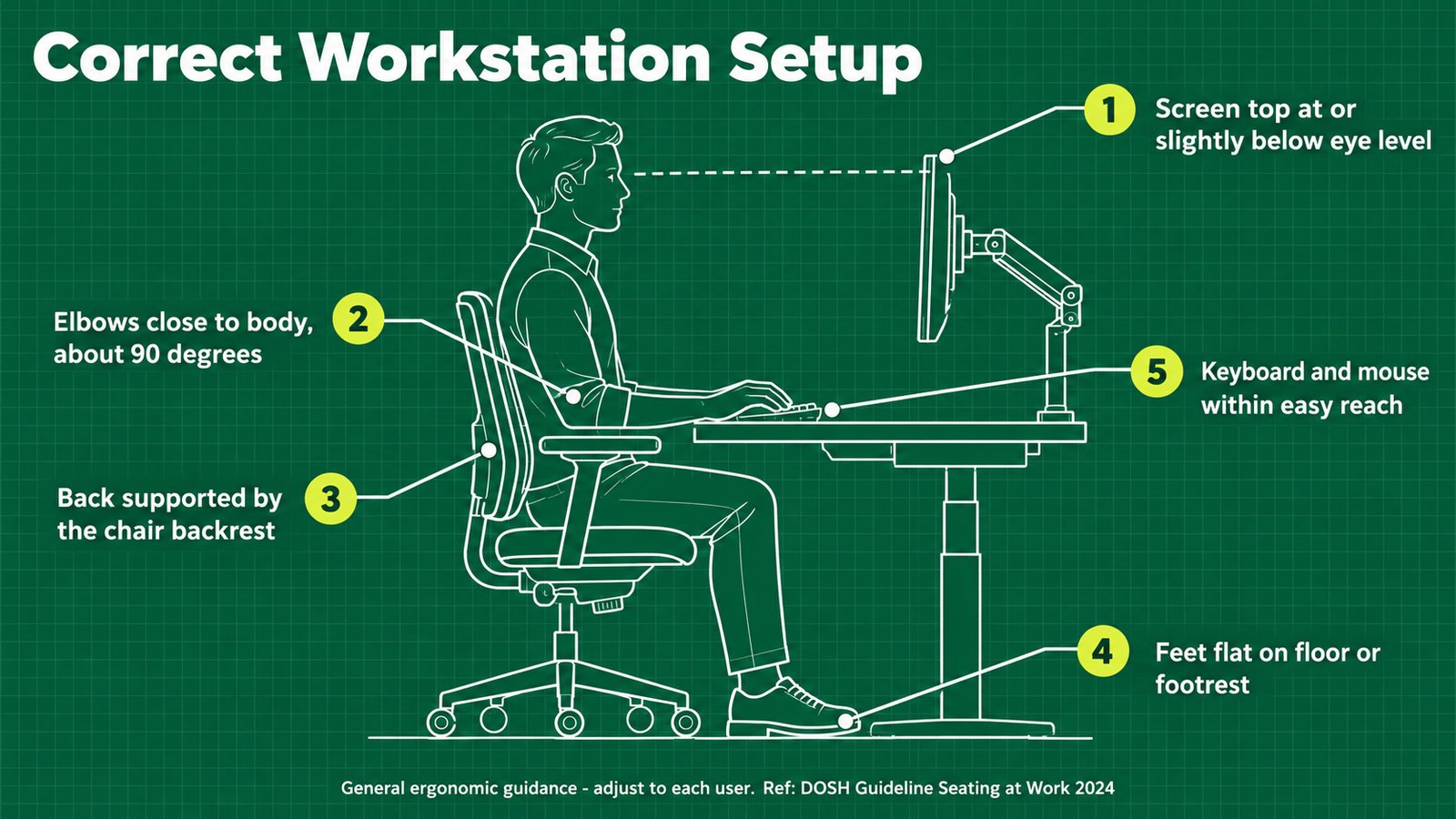
A good setup depends on the person and task. Check that the employee can use the chair, screen, keyboard and mouse without repeated awkward reaching or twisting. Adjustability can help when people share workstations or have different needs, but equipment must be set up and used properly.
Common mistakes
- Treating one chair or monitor setting as suitable for every employee.
- Assuming that a height-adjustable desk removes the need to assess the task and workstation.
What can you check this week?
Use this short walk-through with an employee. Record any issues, agree who will act and set a follow-up date.
- The employee can adjust the chair and understands its controls.
- The chair is stable and in good working condition.
- The employee can work without repeated reaching, twisting or leaning forward.
- The monitor suits the task and is positioned for comfortable viewing.
- Keyboard and mouse are within comfortable reach.
- Frequently used items are accessible without awkward stretching.
- Glare, reflections and poor lighting have been checked.
- Cables, walkways and emergency routes are clear.
- Storage is stable and heavier items are not placed where they may fall.
- Employees know how to report discomfort, hazards or equipment faults.
- Each identified action has an owner and target date.
- The setup will be reviewed if the task, equipment, user or layout changes.
If you cannot fix an issue during the walk-through, record it and assign responsibility. Later, check whether the action reduced the risk.
What should Penang and MNC sites consider?
Many multinational sites already run ISO 45001 occupational health and safety management systems. If you are part of one, fold OSHA 2024 office duties into the same HIRARC register and action-tracking process instead of creating a separate checklist.
That makes it easier to use the process your site already knows for office hazards as well as other workplace risks. Keep the assessment specific to the office tasks and people affected, and track the resulting controls in the same system.
How can iGreen support an office workstation project?
iGreen Office Furniture can support employers planning workstation improvements through site assessment, space planning and furniture recommendations. Its range includes ergonomic task chairs and ActivDesk height-adjustable desks; ask iGreen for the relevant product test reports when specifying furniture. iGreen also holds ISO 9001, ISO 14001 and ISO 45001 certifications.
Products and site-planning support can help you act on your workplace assessment. They do not replace your risk assessment or any work required from a competent OSH professional.
Frequently Asked Questions
Does OSHA apply to a small office in Malaysia?
Yes. The Act applies to all places of work throughout Malaysia, subject to the First Schedule exclusions. A small office still has employer duties, including the section 18B risk-assessment requirement.
Does every employer need to appoint an OSH Coordinator?
No. Section 29A requires an OSH Coordinator when the workplace is not in a class required to appoint an SHO and the employer has five or more employees at that workplace. Other OSHA duties still apply if the threshold is not met.
Is an OSH Coordinator the same as a Safety and Health Officer?
No. They are different roles under the Act. The Coordinator coordinates OSH issues at a workplace that meets the section 29A conditions. An SHO is required for classes of workplaces specified under section 29.
Does buying ergonomic furniture make an office OSHA-compliant?
No. Furniture may help control a risk, but you still need to assess risks, choose suitable controls, implement them and check whether they work. A chair or adjustable desk cannot by itself demonstrate that the risks have been assessed and controlled.
What should an office do first if it has not assessed workstation risks?
Walk through the workplace, observe tasks, speak with employees and record hazards and who may be affected. Use DOSH’s HIRARC and ergonomic guidance to structure the assessment, then assign and follow up on necessary controls. Get competent advice if the risks or legal requirements are beyond your organisation’s capability.
Reviewed by Tim Cheng, Managing Director, iGreen Office Furniture
Planning a workstation upgrade? Request a site assessment from iGreen (KL and Penang).
Sources